
Selection Button No.3
Change setup parameters
This can be called up either by clicking on the icon or via the menu <Setup>, <Setup Default Settings>. Select the file tab Outputs. The programming parameters are provided with default values. If this default is to be changed or the setting is to be checked, then this section is of importance.
After an adjustment of the encoder, it is necessary in most cases to align the mechanical zero point to the electrical zero point of the encoder with the system or the machine. This so-called virtual zero point will be activated by a control pulse at the external ‘SET’ input or controlled with software, when the encoder reaches the desired position.
Important: This should be done only in Encoder stillstand mode.
This adjustment point can be assigned a programmable set value (preset value). Thus a virtual zero point is created.
Example: Preset 5000
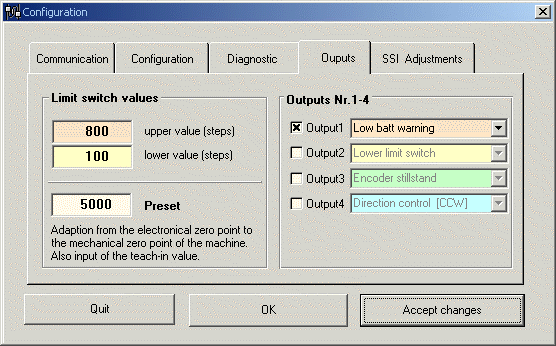
The preset value is effective only after the transmission of the parameters. The entered values are checked to make sure that they are within the permitted limits. To take over the virtual zero point in the field, the encoder is brought into the desired mechanical position and the SET input (of the encoder) is triggered by a control pulse. The preset value will be taken over for this position.
Clicking on the <Accept Values> button results in the changed data being taken over into the memory, so that all the subsequent parameters may be updated. The window is n o t closed.
The <OK> button has the same function as <Accept Values>, but in addition the window is closed.
<Cancel> undoes entries and closes the window.